
スクレイピング構想
※前回は、画面を中心にして構想を紹介いたしました。
※今回は、実際のコード(python)を紹介したいと思います。
具体的には、以下の内容です:
○本日の天気(含む1週間、含む1時間毎)、○本日は何の日、○潮回り(潮、干潮/満潮時間)、○本日の予定(含む今後の予定)
○本日のTODOリスト(含む今後の予定)、○本日みたいテレビ番組、○昨日のコロナ状況(ワクチン接種率、感染者数)、本日のニュース
○一日一言[aWord.p]、○図書館期限切れ[library.py]、○メール受信件数
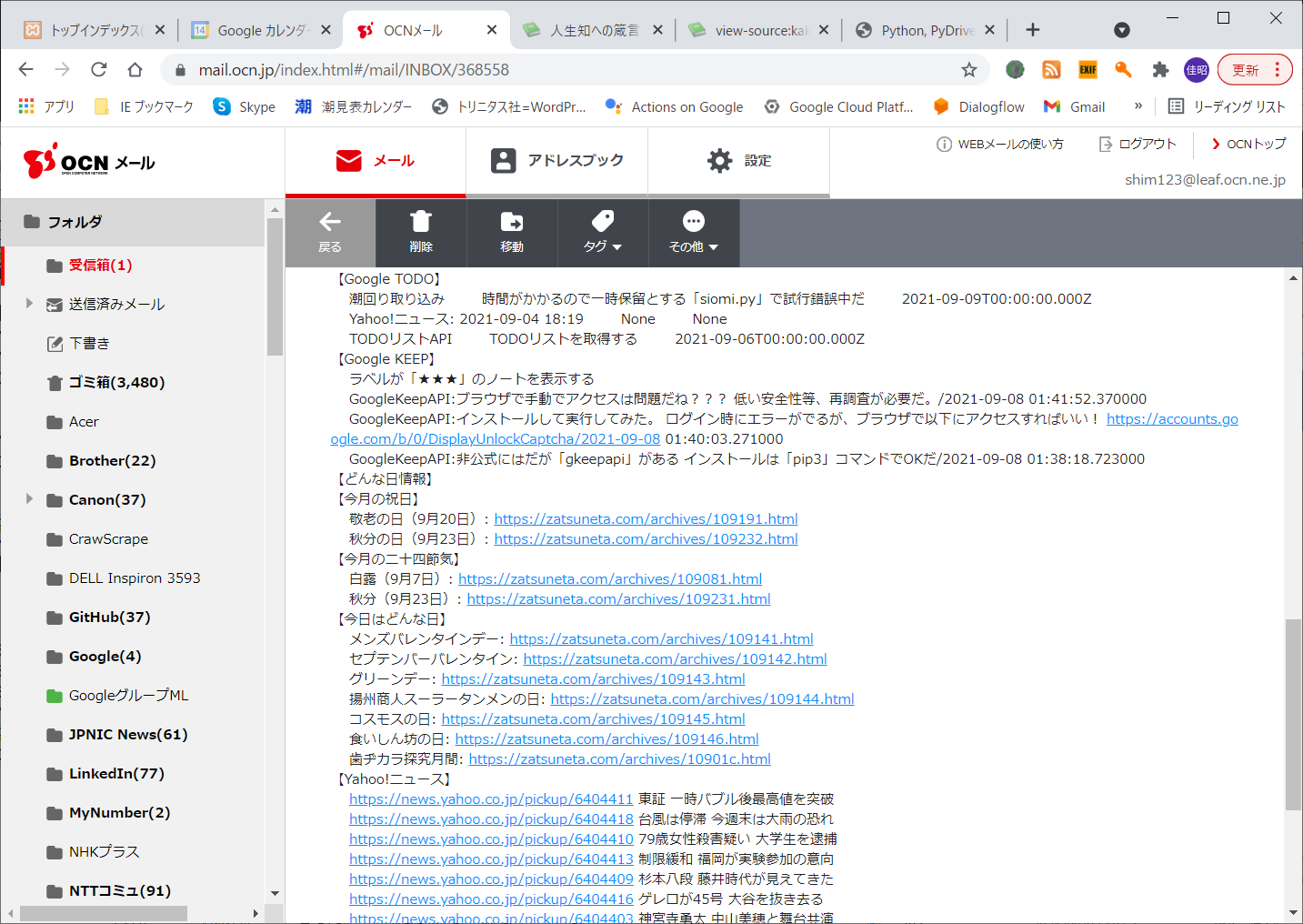
取得する最終的なデータ(再掲)
○受信したメール内容


作成したコードのドキュメント
今回、詳細は省略しますが、python言語で開発したプログラムのドキュメントは
「Sphinx」で作成しました。
※Java言語で言うところの「JavaDoc」に相当するものです。
以下は、簡単な紹介です。
○ドキュメント生成
参考URL:GoogleスタイルのPython Docstringの入門
https://qiita.com/11ohina017/items/118b3b42b612e527dc1d
○Sphinxとは
Sphinxは、reStructuredTextという形式で記載されたテキストををHTML、
PDFやepubなどの様々な形式へ変換することができるOSSのドキュメント生成ツールです。
Pythonの公式ドキュメントはSphinxを使って書かれています。
Sphixを使用した、Docstringの活用方法は下記を参照して下さい。
https://qiita.com/futakuchi0117/items/4d3997c1ca1323259844
○ドキュメントサンプル


○library
○module
○一覧
○検索
○索引等
を生成してくれます。
○ドキュメントを生成するソースコードサンプル


モジュール一覧
○関数一覧
| 関数名 | 説明 | 技術要素 |
|---|---|---|
| Calen() | Googleカレンダーから本日の予定を取得 | Google Calendar API |
| Tv(week) | 「tv.txt」ファイルからテレビ番組表を取得 | ファイル |
| Weather() | Yahoo!天気から本日&明日の天気を取得 https://weather.yahoo.co.jp/weather/jp/14/4610.html |
スクレイピング |
| Todo() | GoogleTodo(Task)APIからタスク(TODO)を取得 | GoogleTodo(Task)API |
| Keep() | GoogleKeepAPIからノートを取得 | GoogleKeepAPI |
| News() | Yahoo!ニュースから本日のニュースを取得 https://www.yahoo.co.jp/ |
スクレイピング |
| WeatherWeek() | 1週間分の天気を取得、 iCal週間天気予報 http://weather.masuipeo.com/yokohama.ics |
スクレイピング |
| OneHour() | 港南区の1時間毎の天気を取得 https://tenki.jp/forecast/3/17/4610/14111/1hour.html |
スクレイピング |
| Tide() | 与えられた日付の潮回り、満潮、干潮時刻、潮高を取得 http://sio.mieyell.jp/select?po=21401 |
スクレイピング |
| Vaccine() | ワクチン接種率を取得 https://www.city.yokohama.lg.jp/kurashi/kenko-iryo/yobosesshu/vaccine/vaccine-portal/ |
スクレイピング |
| WhatDay() | 今日はどんな日かを取得 https://zatsuneta.com/category/anniversary%s.html |
スクレイピング |
| Word() | 一日一言 http://kakugen.aikotoba.jp/knowledge.htm |
スクレイピング |
| RecvIMAP() | OCNメールをIMAPで受信 https://mail.ocn.jp/index.html#/mail/ |
IMAP API |
| LibAutoLogin() | 中央図書館に自動ログイン https://opac.lib.city.yokohama.lg.jp/opac/ |
スクレイピング |
| Libray() | 中央図書館にアクセスして貸出中の本を取得 | スクレイピング |
| Mail(mail) | メール送信(OCNメール) smtp.ocn.ne.jp |
SMTP API |
本日の予定と今後の予定(Calen())
GoogleAPIを使用するには、事前に「APIの有効化」等、準備が必要です。
以下をご参照下さい。:「GoogleのAPIを使うために必要なキーの取得など準備をする」
########################################################################
##Googleカレンダーから本日の予定を取得する
########################################################################
def Calen():
    mailx = ""
    """Shows basic usage of the Google Calendar API.
    Prints the start and name of the next 10 events on the user's calendar.
    """
    creds = None
    # The file token.pickle stores the user's access and refresh tokens, and is
    # created automatically when the authorization flow completes for the first
    # time.
    if os.path.exists('token.pickle'):
        with open('token.pickle', 'rb') as token:
            creds = pickle.load(token)
    # If there are no (valid) credentials available, let the user log in.
    if not creds or not creds.valid:
        if creds and creds.expired and creds.refresh_token:
            creds.refresh(Request())
        else:
            flow = InstalledAppFlow.from_client_secrets_file(
                'credentials.json', SCOPES1)
            creds = flow.run_local_server()
        # Save the credentials for the next run
        with open('token.pickle', 'wb') as token:
            pickle.dump(creds, token)

    service = build('calendar', 'v3', credentials=creds)

    # Call the Calendar API
    now = datetime.datetime.utcnow().isoformat() + 'Z' # 'Z' indicates UTC time
    events_result = service.events().list(calendarId='primary', timeMin=now,
                                        maxResults=3, singleEvents=True,
                                        orderBy='startTime').execute()
    events = events_result.get('items', [])

    curr=str(datetime.datetime.now())[0:10]
    mailx +=  "【本日の予定】"
    for event in events:
        start = event['start'].get('dateTime', event['start'].get('date'))
        if re.compile(curr).search(start):
            mailx +=  start[0:16] + " " + event['summary'] + "\n"
        else:
            mailx +=  "本日の予定はありません\n"
        break;

    mailx +=  "【今後の予定: Max3件】" + "\n"
    if not events:
        mailx +=  '登録された予定はありません。\n'
    for event in events:
        start = event['start'].get('dateTime', event['start'].get('date'))
        mailx +=  "    " + start[0:16] + " " + event['summary'] + "\n"

    return mailx;
本日のテレビ番組(Tv(week))
########################################################################
##「tv.txt」ファイルからテレビ番組表を取得
########################################################################
def Tv(week):
    mailx = "【テレビ番組】\n"

    file_path="tv.txt"
    #形式は以下: ['曜日', '番組名']

    data = {}
    with open(file_path, encoding="utf-8") as fh: # ファイルの読込み
        csv_reader = csv.reader(fh, delimiter=',', quotechar=",")
        for row in csv_reader:
            data[row[0]] = row[1]   ##dict型に登録

    if ( data[week] != "" ):
        mailx = "    " + data[week] + "\n"
    else:
        mailx = "    登録されている番組はありません\n"

    return mailx
本日の天気(&1週間の天気)(Weather())
○処理対象のhtmlコード
htmlの抽出条件は、クラス名:’forecastCity’」としました。
○pythonコード
簡単な説明:
Requestsモジュールとは
Requestsは、PythonのHTTP通信ライブラリです。
Requestsを使うとWebサイトの情報取得や画像の収集などを簡単に行えます。
Beautiful Soup モジュールとは
HTML や XML ファイルからデータを取得し、解析するライブラリです。
主に requests モジュールと組み合わせて、Web スクレイピングに使用されます。
########################################################################
##Yahoo!天気から本日&明日の天気を取得する
########################################################################
def Weather():
    url = 'https://www.yahoo.co.jp/'
    res = requests.get(url)

    mailx = ""
    #以下のURLは神奈川県東部(横浜市)
    url = "https://weather.yahoo.co.jp/weather/jp/14/4610.html"
    r = requests.get(url)
    soup = BeautifulSoup(r.text, 'html.parser')
    rs = soup.find(class_='forecastCity')
    rs = [i.strip() for i in rs.text.splitlines()]
    rs = [i for i in rs if i != ""]
#    print(rs[0] + "の天気は" + rs[1] + "、明日の天気は" + rs[19] + "です。")
    mailx += "    " + rs[0] + "の天気は" + rs[1] + "、明日の天気は" + rs[19] + "です。\n"

    return mailx
本日のメモ(Todo())
########################################################################
##GoogleTodo(Task)APIからタスク(TODO)を取得する
########################################################################
def Todo():
    """Shows basic usage of the Tasks API.
    Prints the title and ID of the first 10 task lists.
    """
    mailx = ""

    creds = None
    # The file token.json stores the user's access and refresh tokens, and is
    # created automatically when the authorization flow completes for the first
    # time.
    if os.path.exists('token.json'):
        creds = Credentials.from_authorized_user_file('token.json', SCOPES2)
    # If there are no (valid) credentials available, let the user log in.
    if not creds or not creds.valid:
        if creds and creds.expired and creds.refresh_token:
            creds.refresh(Request())
        else:
            flow = InstalledAppFlow.from_client_secrets_file(
                'taskid.json', SCOPES)
            creds = flow.run_local_server(port=0)   #Here, AuthorizedError

###DESK-TOP-Client-TASKID

        # Save the credentials for the next run
        with open('token.json', 'w') as token:
            token.write(creds.to_json())
    service = build('tasks', 'v1', credentials=creds)


    # TaskList: Call the Tasks API
    results = service.tasklists().list(maxResults=10).execute()
    items = results.get('items', [])

    dict01 = {}
##当面タスクリストは省略する、TODOタスクのみ表示する
#    if not items:
#        print('No task lists found.')
#       mailx = '    No task lists found.'
#    else:
#       mailx = '    Task lists:'

#        for item in items:
#            print("    ", u'{0}: {1}'.format(item['title'], item['id']))
#           mailx = ("    ", u'{0}: {1}'.format(item['title'], item['id']))
#           dict01[item['id']] = item['title']

    tasklist_name = 'dGVaa0JTdE1YNWpydWc2MQ'    ##TODOリスト
    results = service.tasks().list(tasklist=tasklist_name,maxResults=10).execute()

    tasks = results.get('items', [])

    if not tasks:
        mailx += '    No task found.'
    else:
        for task in tasks:
            mailx += "    "+task['title']
            mailx += "        "+str(task.get('notes'))
            mailx += "        " + str(task.get('due')) + "\n"
##以下は当面省略する
#           print ("        updated:" +task['updated'])
#            print ("        status:" +task['status'])

    return mailx
本日のTODOリスト(Keep())
########################################################################
##GoogleKeepAPIからノートを取得する
########################################################################
def Keep():
    mailx = ""
    #Gmailアカウントでログイン

#   userID = "dummy456@gmail.com"
#   Password = "dummy789"
#   Password = "application-key"   #アプリキーを作成した

    csv_file = open("pass.txt", "r")
    f = csv.reader(csv_file, delimiter=",")

    header = next(f)    #空読み
    UserID = ""
    Password = ""
    for item in f:
        UserID = base64.b64decode(item[0]).decode()
        Password = base64.b64decode(item[1]).decode()
        break

    keep = gkeepapi.Keep()
    s = keep.login(UserID,Password)

    ####gkeepapiドキュメント
    ####https://gkeepapi.readthedocs.io/en/latest/#getting-list-content
    ####### x.title タイトル x.text  テキスト x.color x.archived x.pinned

    ####ログインエラー時、ブラウザで以下をアクセスする
    ####https://accounts.google.com/b/0/DisplayUnlockCaptcha

    gnotes3 = keep.find(labels=[keep.findLabel('★★★')])
#   print("ラベルが「★★★」のノートを表示する")
    mailx += "    ラベルが「★★★」のノートを表示する\n"
    for x in gnotes3:
#       print("=========================================")
#       print(x.title + ":" + x.text.replace('\n', ' ') + "/" + str(x.timestamps.created))
        mailx += "    " + x.title + ":" + x.text.replace('\n', ' ') + "/" + str(x.timestamps.created) + "\n"
##
#print("タイトルに'GoogleKeepAPI'を持つノートを表示する")
#gnotes = keep.find(query='GoogleKeepAPI')

#gnotes2 = keep.all()
#print("全てのノートを表示する")

    return mailx;
本日の潮回り(Tide())
○処理対象のhtmlコード
htmlの抽出条件は、タグ名:’tbody’としました。
○pythonコード
########################################################################
###与えられた日付の潮回り、満潮、干潮時刻、潮高を取得する
########################################################################
def Tide(day):
    mailx = ""
    response = requests.get('http://sio.mieyell.jp/select?po=21401')
    soup = BeautifulSoup(response.content, 'html.parser')   #文字化けしない

#soupに関しては以下が整理されている:https://senablog.com/python-bs4-modification/#toc_id_3_1
#    soup.br.replace_with("*")  #やはり変換できていない!?

    for i in soup.select("br"):
        i.replace_with("+")

    tbody = soup.find_all('tbody')
    rows = tbody[0].findAll('tr')

    count =0
    for tr in rows:
        count += 1
        count2 = 0
        for td in tr.findAll('td'):

            count2 += 1
            td1 = td.get_text().replace('
', ' ')
            td2 = td1.replace('\n', '')
            td2 = td1.replace('\r', '')

            if count2 == 1:
                if td2[0:2] != day:
                    break
                mailx += "    日/曜日: " +str(td2.split('+'))

            elif count2 == 2:
                mailx += " 潮: " + td2 + "潮" + "\n"
            elif count2 == 3:
                mailx += "    満潮時刻: " +str(td2.split('+'))
            elif count2 == 4:
                mailx += " 潮高: " +str(td2.split('+')) + "\n"

            elif count2 == 5:
                mailx += "    干潮時刻: " +str(td2.split('+'))

            elif count2 == 6:
                mailx += " 潮高 :" +str(td2.split('+')) + "\n"
                mailx += "    [潮干狩],           [日出日入],          [月出月入],           [月齢]\n"
##潮干狩り情報で是非とも表示したい項目だ(日出日入/月出月入)
            else:
                if count2 == 10:
                    mailx += "    " + str(td2.split('+')) + "\n"

                else:
                    mailx += "    " + str(td2.split('+'))

    return mailx
本日は何の日(WhatDay())
○処理対象のhtmlコード
htmlの抽出条件は、タグ名:’div’、クラス名:’article’としました。
○pythonコード
########################################################################
###今日はどんな日かを取得する
########################################################################
def WhatDay():
    url="https://zatsuneta.com/category/anniversary%s.html"
    mailx =""

    ##本日の日付をurlに設定する
    now=str(datetime.datetime.now())[0:10]
    month = now[5:7]        #月を取り出す
    url = re.sub(r'%s', month, url)

    ##日付を取り出す
    dayx = now[8:]
    if len(dayx) != 2:
        dayx = "0" + dayx

    r = requests.get(url)
    soup = BeautifulSoup(r.content, 'html.parser')

    ##祝日・休日
    div = soup.find_all('div', class_='article')

    ul = div[0].find_all('ul')

    mailx += "【今月の祝日】\n"
    for item in ul[0].find_all('a'):
        mailx += "    " + item.attrs['title'] + ": " + item.attrs['href'] + "\n"
    mailx += "【今月の二十四節気】\n"
    for item in ul[1].find_all('a'):
        mailx += "    " + item.attrs['title'] + ": " + item.attrs['href'] + "\n"
    day_format = "
本日までのワクチン接種率(Vaccine())
########################################################################
###ワクチン接種率を取得する
########################################################################
##東京と横浜市の感染者数も追加して表示したい!
##download()関数を使用するのか!    https://teratail.com/questions/204435
def Vaccine():
    mailx = ""
    ##神奈川県横浜市
    url="https://www.city.yokohama.lg.jp/kurashi/kenko-iryo/yobosesshu/vaccine/vaccine-portal/"
    r = requests.get(url)

    soup = BeautifulSoup(r.content, 'html.parser')

    rs = soup.find_all('div', class_="img-area")
    rs = rs[1].find('p')
    rs = rs.find('span')

    string = rs.text
    splits = string.split('、')

    item02 = re.sub(r"\D" , "" , splits[3])
    item02 = item02[1:]
    item03 = re.sub(r"\D" , "" , splits[4])
    item03 = item03[1:]
    item01 = "3778876"      ##横浜市の人口

    ritu01 = (int(item02)+int(item03))/int(item01)
    ritu01 = int(ritu01*100)
    ritu02 = int(item03)/int(item01)
    ritu02 = int(ritu02*100)

    mailx += "    横浜市ワクチン接種率  第1回目: "+ str(ritu01) + "%     第2回目: "+ str(ritu02) + "%" + "\n"

##日本全国
    url="https://www.kantei.go.jp/jp/headline/kansensho/vaccine.html"
    r = requests.get(url)

    soup = BeautifulSoup(r.content, 'html.parser')
    rs = soup.find('tbody')

    tbody = soup.find_all('tbody')
    rows = tbody[0].findAll('tr')

    count =0
    vicc_list = [1,2,3]
    for tr in rows:
        count += 1
        count2 = 0
        if count != 0:
            for td in tr.findAll('td'):
                count2 += 1
                if count2 == 2:
                    vicc_list[count-1] = td.text


    mailx += "    全国ワクチン接種率   " + "第1回目: " + str(vicc_list[1]) + "   第2回目: " + str(vicc_list[2]) + "\n"

    infected = "infected.txt"
    url="https://www3.nhk.or.jp/n-data/opendata/coronavirus/nhk_news_covid19_prefectures_daily_data.csv"

    file_name = infected

    res = requests.get(url, stream=True)
    if res.status_code == 200:
        with open(file_name, 'wb') as file:
            res.raw.decode_content = True
            shutil.copyfileobj(res.raw, file)

    dt_now = datetime.datetime.now()
    ##「#」はWindowsのみ、Linuxでは「-」
    dt_now = dt_now.strftime('%Y/%#m/%#d')

    dt_now = datetime.datetime.now() + datetime.timedelta(days=-1)
    dt_now = dt_now.strftime('%Y/%#m/%#d')

    with open(infected, 'r', encoding='UTF-8') as f:
        while line := f.readline():
            line = line.rstrip()

            if re.compile(dt_now).search(line) and re.compile('東京都').search(line):
                res = line.split(",")
                mailx += "    年月日:" + res[0] + " 都道府県名:" + res[2] + "   1日の感染者数:" + res[3] + " 感染者数累計:" + res[4] + "\n"
            if re.compile(dt_now).search(line) and re.compile('神奈川県').search(line):
                res = line.split(",")
                mailx += "    年月日:" + res[0] + " 都道府県名:" + res[2] + " 1日の感染者数:" + res[3] + " 感染者数累計:" + res[4] + "\n"

    f.close()

    return mailx
本日のニュース(News())
○処理対象のhtmlコード
htmlの抽出条件は、タグ名:’a’、文字列:”news.yahoo.co.jp/pickup”を含むものとしました。
○pythonコード
########################################################################
##Yahoo!ニュースから本日のニュースを取得する
########################################################################
def News():
    mailx=""
    url = 'https://www.yahoo.co.jp/'
    res = requests.get(url)

    soup = BeautifulSoup(res.text, "html.parser")
    elems = soup.find_all(href=re.compile("news.yahoo.co.jp/pickup"))

    for elem in elems:
        mailx += "    " + elem.attrs['href']+" "+elem.find('h1').find('span').string + "\n"

    return mailx
1日1言(Word())
○処理対象のhtmlコード
htmlの抽出条件は、タグ名:’table’としました。
○pythonコード
########################################################################
###一日一言
########################################################################
def Word():

    mailx = ""

#豆知識
#   http://kakugen.aikotoba.jp/knowledge.htm        第一章  1-100まで
#   http://kakugen.aikotoba.jp/knowledge2.htm       第二章  101-200
#   http://kakugen.aikotoba.jp/knowledge3.htm       第三章  201-300
#   http://kakugen.aikotoba.jp/knowledge4.htm       第四章  301-320

#url = 'http://kakugen.aikotoba.jp/'
    html_array = {\
        '100':"knowledge.htm", \
        '200':"knowledge2.htm",\
        '300':"knowledge3.htm",\
        '320':"knowledge4.htm"\
    }

    #世界傑作格言集
    url = 'http://kakugen.aikotoba.jp/'


    ##本日の年/月/日を取り出す
    now=str(datetime.datetime.now())[0:10]
    year =  now[0:4]        #年を取り出す
    month = now[5:7]        #月を取り出す

    ##日付を取り出す
    day = now[8:]
    if len(day) != 2:
        day = "0" + day

#   mailx += "    年:"+year + " 月:" + month + " 日:"+ day
#   print("年:"+year + " 月:" + month + " 日:"+ day)

    ##経過日数
    date = datetime.datetime.strptime(year+'-1-1', '%Y-%m-%d')
    date.today()
    datetime.datetime(int(year), int(month), int(day), 00, 0, 00, 00000)
    d = date.today() - date
#   mailx += "    経過日数:"+str(d.days)
#   print("経過日数:"+str(d.days))
    number = int(d.days)
#   mailx += "    number:"+str(number)
#   print("number:"+str(number))
    if int(d.days) > 320:
        number = 321 -d.days

    if number <= 100:
        numind = ""
    elif number <= 200:
        numind = "200"
    elif number <= 300:
        numind = "300"
    else:
        numind = "320"

    file = html_array[numind]

#   mailx += "    html_file:"+file
#   print("html_file:"+file)

    ##urlを決定する
    url = url + file
#   mailx += "    " + url
#   print(url)


    r = requests.get(url)
    soup = BeautifulSoup(r.content, 'html.parser')
    rs = soup.find_all('table')

    for item in rs:
        trs = item.find_all('tr')
        for tr in trs:
            tds = tr.find_all('td')
            next_print = 0
            for td in tds:
                if next_print == 1:
                    mailx += "    内容:"+td.text + "\n"
#                   print("内容:"+td.text)
                    next_print = 0
                num_str = 'NO.' + str(number)
                if td.text == num_str:
                    mailx += "    番号:"+td.text
#                   print("番号:"+td.text)
                    next_print = 1

    return mailx
図書館期限切れ(Libray())
########################################################################
#   中央図書館にアクセスして貸出中の本を取得
########################################################################
def Libray():
    mailx = ""
    soup = LibAutoLogin()
    table = soup.find('table')
    form = table.find('form')
    trs = form.find_all('tr', class_='middleAppArea')
    tds = trs[0].find_all('td')

##予約した本ができた場合、別画面に行くことがあるHCを参照

##貸出中の資料を表示(現在は、期限切れに限定していない)
#print("\n")
    count = 0
    want = ""
    for tr in trs:
        tds = tr.find_all('td')
        count = 0
        for td in tds:
            str = td.text.replace("\n", "").replace("\t", "").replace(" ", "")
#        if count%5 == 0 or count%5 == 2 or count%5 == 3 or count%5 == 4:
            if count%6 == 1:
                want += "    "
            if count%6 == 1 or count%6 == 3 or count%6 == 4 or count%6 == 5:
                want += str + ":"
            if count%6 == 5:
                want += "\n"
            count += 1

    mailx += want


    return mailx
自動ログインの方法(LibAutoLogin())
########################################################################
#   中央図書館に自動ログインする
########################################################################
def LibAutoLogin():
    #userid&userpasswd
    userid = "dummy450"
    userpw = "dummy789"
    # ログイン対象のWebページURLを宣言します
    url = "https://opac.lib.city.yokohama.lg.jp/opac/"

    ##add by
    options = webdriver.ChromeOptions()
#   options = Options()
    ##以下の2行でエラーがでなくなる:自動ログインで出るエラーだ!
    ##[11752:28124:1006/071633.656:ERROR:device_event_log_impl.cc(214)]
    ##[07:16:33.656] USB: usb_device_handle_win.cc:1048 Failed to read
    ##descriptor from node connection: システムに接続されたデバイスが機能し
    ##ていません。 (0x1F)
#   options.add_experimental_option(‘excludeSwitches’, [‘enable-logging’])
    options.add_experimental_option("excludeSwitches", ["enable-logging"])
    options.use_chromium = True
#   driver = webdriver.Chrome(options=options)
    # 起動するブラウザを宣言します:「\」を「\\」でエスケープした
    browser = webdriver.Chrome(executable_path="c:\\users\\shim1\\anaconda3\\lib\site-packages\\chromedriver_binary\\chromedriver.exe", options=options)

    html = browser.get(url)

    # 対象URLをブラウザで表示します。
#    html = browser.get(url)
    ##ページ表示の確認
    time.sleep(3)
    ###ページ遷移確認、以降はこの待機を省略します、本当は必要です
    if browser.current_url == url:
        time.sleep(2)

    # ログインIDとパスワードを入力します。
    login_id = browser.find_element_by_name("USERID")
    login_id.send_keys(userid)
    time.sleep(2)

    password = browser.find_element_by_name("PASSWORD")
    password.send_keys(userpw)

    # ログインボタンをクリックします。
    login_btn = browser.find_element_by_name('LOGIN')
    login_btn.click()

    time.sleep(1)

    a = browser.find_element_by_xpath("//*[@id='nav_target']/div[2]/a[6]")
    a.click()   ##「利用状況」をクリックする
    ##上記で問題があれば直接URLを指定する
#   browser.get('https://opac.lib.city.yokohama.lg.jp/opac/OPP1000')

    time.sleep(1)

    #ページソースの取得:https://teratail.com/questions/309899
    html = browser.page_source

    soup = BeautifulSoup(html, "html.parser")

    return soup
メール受信件数(RecvIMAP())
########################################################################
##OCNメールをIMAPで受信
########################################################################
def RecvIMAP():

    mailx = ""
    ##OCNメールをIMAPで、未読件数、既読件数を取得する

    ##でもやはりWEBの方がいいか!勉強にもなるし(^_^)。
    #   https://mail.ocn.jp/index.html#/mail/
    #   https://login.ocn.ne.jp/auth/s1001/pc/AuthLoginDisplay.action

    mail = imaplib.IMAP4_SSL('imap.ocn.ne.jp')

    mypassword = 'dummy456'
    address = 'dummy@leaf.ocn.ne.jp'
    mail.login(address, mypassword)
    mail.select("inbox")

    ##既読件数
    typ, messageIDs = mail.search(None, "UNSEEN")
    messageIDsString = str( messageIDs[0], encoding='utf8' )
    listOfSplitStrings = messageIDsString.split(" ")
    count1 = 0
    if len(listOfSplitStrings) == 0:
        mailx += "    受信トレイ:未読メールはありません\n"
    else:
        count1 = len(listOfSplitStrings)
        mailx += "    受信トレイ:未読件数" + str(count1) + "\n"

    ##未読件数
    typ, messageIDs = mail.search(None, "SEEN")
    messageIDsString = str( messageIDs[0], encoding='utf8' )
    listOfSplitStrings = messageIDsString.split(" ")
    count2 = 0
    if len(listOfSplitStrings) == 0:
        mailx += "    受信トレイ:既読メールはありません\n"
    else:
        count2 = len(listOfSplitStrings)
        mailx += "    受信トレイ:既読件数" + str(count2) + "\n"

    ##総件数
    mailx += "    総件数 " + str(count1 + count2) + "\n"


    return mailx
上記の内容をメール送信する(Mail(mail))
########################################################################
##メール送信
#   OCNメール情報:https://support.ntt.com/ocn/support/pid2990021006
#   参照元:https://techacademy.jp/magazine/22806
#   参照元:https://www.python-izm.com/advanced/mail_send/
########################################################################
def Mail(mail):

    smtp_host = 'smtp.ocn.ne.jp'
    smtp_port = 465
    username = 'dummy@leaf.ocn.ne.jp'
    password = 'dummy123'
    from_address = 'dummy@leaf.ocn.ne.jp'
    to_address = 'dummy@leaf.ocn.ne.jp,dummy123@docomo.ne.jp'

    charset = 'ISO-2022-JP'
    charset = 'UTF-8'

    subject = '本日の予定: ' + str(datetime.datetime.now())[0:16]


    body = mail

    msg = MIMEText(body, 'plain', charset)
    msg['Subject'] = Header(subject, charset)
    msg['From'] = from_address
    msg['To'] = to_address

    msg['Date'] = formatdate(localtime=True)

    smtp = smtplib.SMTP_SSL(smtp_host, smtp_port)
    smtp.login(username, password)

    sendList = to_address.split(',')
    result = smtp.sendmail(from_address, sendList, msg.as_string())
#   print(result)

    smtp.quit()
著者:志村佳昭(株式会社トリニタス 技術顧問)